
Chrome
Install from Chrome Web Store, then pin LinkWise to your toolbar.
- Capture any public page with one click
- Transform with trust
- Search, ask, export
Browser extension · capture public web content
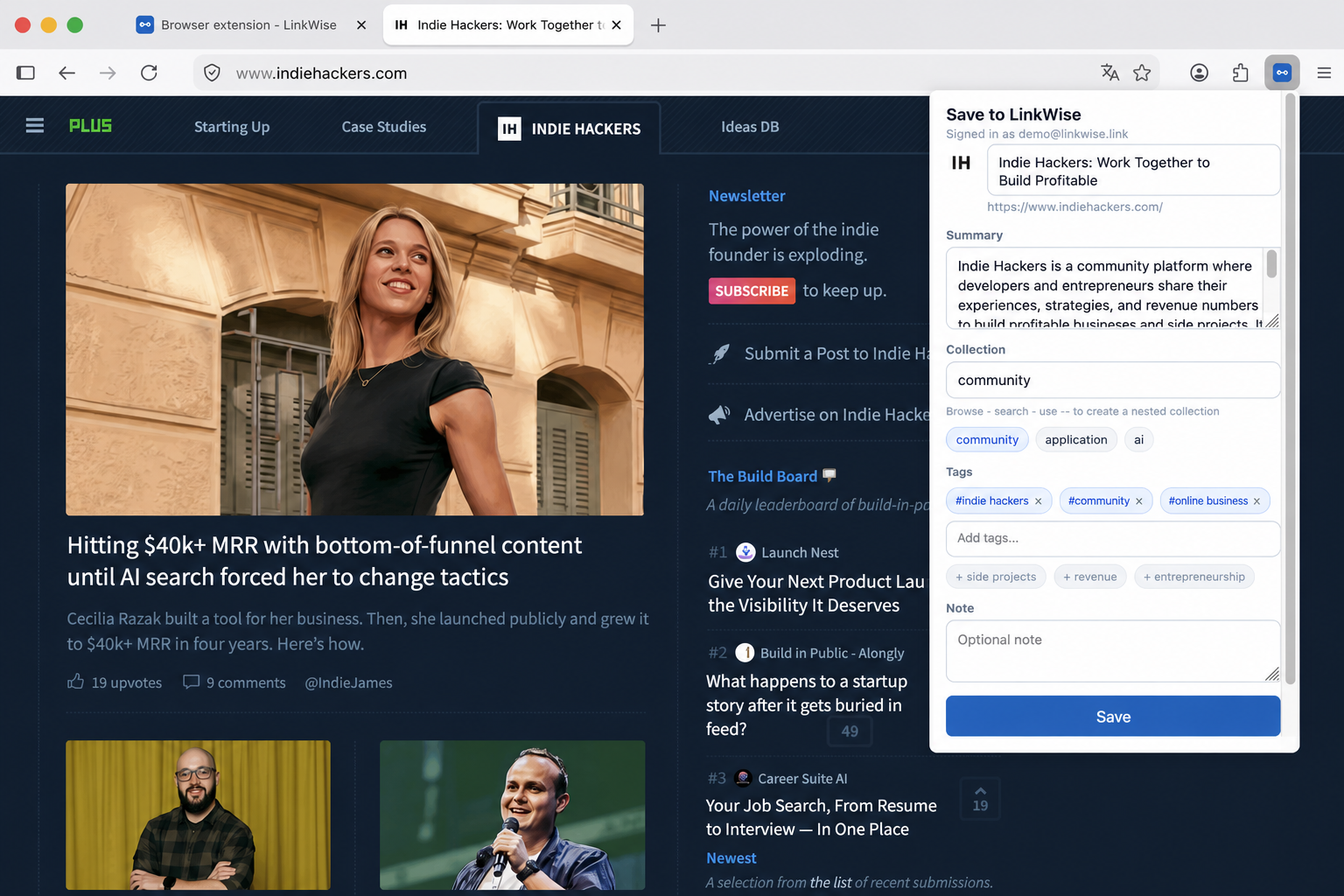
One-click save for articles, YouTube, and useful sites. Transform them into searchable, connected knowledge assets—then export into your knowledge base. Available for Chrome, Edge, and Firefox.
Chrome · Edge · Firefox
Browse any page, click the LinkWise icon, and hit Save this page.
Install from Chrome Web Store, then pin LinkWise to your toolbar.

Same extension package as Chrome — install from Edge Add-ons.

Install from Firefox Add-ons (140+), then open the toolbar popup once.
01 → 02 → 03
After installing from the store, connect your account so the popup can save pages.
Use the same account as your LinkWise library so saves land in the right place.
One-time sync so the extension popup can save pages to your library. In Firefox, click the toolbar icon once and allow site access if prompted.
Connecting…
If you signed in with Google and the site shows Connected while the popup still asks you to log in, update LinkWise from the Chrome Web Store or Edge Add-ons, then Connect again on this page and confirm the popup email. Older builds often fail to sync Google sessions.
Browse any page, click the LinkWise icon, and hit Save this page.